



 Login with Email
This is the vocal removal/instrument isolation (VRII) page for Song Surgeon. VRII is an AI powered tool that can process multi-instrument tracks and separate or isolate specific instruments. The results returned after processing are:
Beginning in early 2026 we upgraded and implemented a 2nd generation of this AI based tool which provides better instrument isolation than the earlier 1st generation version. This tool processes both audio and video files.
To use this web-based tool, log-in, upload a file, choose the instrument to be isolated, and then click the START button. Once the VRII tool process a file it returns two files. One file contains the single instrument selected to be removed. The second contains the rest of the mix or instrumentation.



Processed files can be listened to on this web page or downloaded to your computer. If you are using this tool on a trial/free basis and are not a customer, you will be able to listen/see the first 30 second of your file. A maximum of 10 files/customer/day can be processed by this tool.
The quality of the files after processing is variable and depends upon many factors but, generally speaking, the files are of sufficiently quality to be very helpful for hearing and thus learning the specific notes for your instrument of choice. This list of instruments for which VRII can process and separate stems is listed below and we are planning on adding additional instruments as noted:
Below are examples of what this tool can do. In each example there are three audio files: The original, the isolate instrument, and the mix without the isolated instrument.


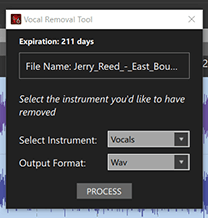
More than a year after the launch of Song Surgeon 6 we released a build of Song Surgeon 6 Pro that has this VRII technology integrated into it. For those who own Song Surgeon 6 Pro and have a subscription to VRII, this build processes the files from the Song Surgeon interface and then opens them directly in Song Surgeon, which streamlines your workflow.
If you are a Song Surgeon 6 Pro customer, you can purchase a VRII subscription from this page or from the Song Surgeon shopping cart. Regardless of which you do, your VRII subscription will appear in your My Account page on the Song Surgeon site. All current purchasers of Song Surgeon Pro 6 receive a free 60 day VRII trial.