

If you’ve ever looked for accurate sheet music or notation for a song you love, you already know the struggle: what’s available online is often incomplete, simplified, or just plain wrong. That’s why many musicians are excited about ABC notation—a text-based way to represent standard music notation that can be printed, shared, and edited.
But here’s the catch: creating ABC notation is easy from a MIDI file, and very difficult from a normal audio song file (like MP3 or WAV)—especially when that audio contains a full band mix. This article explains why, and how modern tools, like those found in Song Surgeon, can bridge the gap.
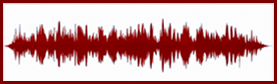
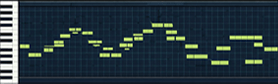
Think of an audio file (MP3, WAV, AAC) as a recording of sound—a captured waveform. It contains the final result: tone, timbre, reverb, vocals, drums, guitars, everything blended together. An audio file is like a photo of a concert performance. You can hear what happened, but the file itself doesn’t explicitly tell you which notes were played.A MIDI file, on the other hand, is not recorded sound. MIDI is more like a digital set of instructions—a performance recipe. It can contain information such as:
 Which notes were played (pitch)
Which instrument sound to use (program/instrument number)
Controller data (pedals, expression, pitch bend, etc.)
Which notes were played (pitch)
Which instrument sound to use (program/instrument number)
Controller data (pedals, expression, pitch bend, etc.)
So MIDI is closer to a player piano roll than a recording. If you load a MIDI file into software, you can swap instruments, change key, slow it down, or print notation—because the file already contains the musical “events.”
ABC notation is fundamentally note-based. It needs:
 Pitch (A, Bb, F#…)
Rhythm (note lengths and timing)
Meter/tempo context (how the timing is organized)
Pitch (A, Bb, F#…)
Rhythm (note lengths and timing)
Meter/tempo context (how the timing is organized)
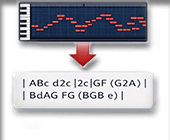
A MIDI file already stores notes directly, so converting MIDI → ABC is mostly a formatting job:
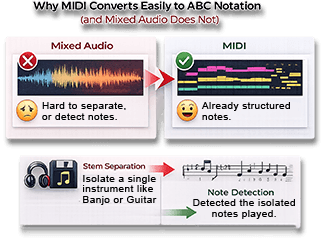
That’s why MIDI-to-ABC conversion is generally reliable and fast. A mixed, multi-instrument audio file is different because it does not contain discrete note events. It contains a blended waveform. To convert that to ABC, software would have to solve several difficult problems at once:
 Separate instruments that overlap in frequency Identify which instrument is playing which note Detect note onsets/offsets accurately Handle chords, vibrato, slides, bends, distortion, reverb
Distinguish melody notes from harmonics and noise
Separate instruments that overlap in frequency Identify which instrument is playing which note Detect note onsets/offsets accurately Handle chords, vibrato, slides, bends, distortion, reverb
Distinguish melody notes from harmonics and noiseIn short: MIDI is “symbolic music.” Audio is “physical sound.” Converting physical sound into symbolic notes is a much harder job—especially when multiple instruments are stacked together.
The good news: while it’s difficult to get notation from a full mix, it becomes much more realistic if you start with a single instrument track (for example: isolated guitar, isolated piano, isolated bass). That’s where modern workflows come in.
Here’s the practical pipeline for converting standard audio → ABC:
Step 1: Stem Separation (Isolate a Single Instrument)
Stem separation uses AI models to split a mixed song into “stems” (separate tracks), such as:
VocalsDrumsBassGuitarKeyboards“Other”Some advanced systems can isolate instruments even more specifically (for example, Song Surgeon has all of the above plus a stem separation algorithm specific to banjo). Once you have a stem that is mostly one instrument, note detection becomes far more accurate.
Why this step matters: Note detection on a full mix is like trying to write down one person’s conversation in a crowded stadium. Separating the instrument is like moving them into a quiet room.
Step 2: Note Detection (Audio → Notes)
Now that you have a mostly single-instrument track, the next job is to detect:
What notes are being playedWhen each note starts and endsHistorically this type of note transcription has been done manually. However, there are now reasonably good Note Detection systems available and their accuracy is steadily increasing with the growing use of AI. Good transcription engines can output a timeline of notes (pitch + timing). The cleaner the isolated track, the better this works.
Best results usually come from:
Clear, monophonic instruments (single-note lines)Minimal effects (less distortion, less heavy reverb)Strong separation quality
Step 3: Create a MIDI or MusicXML File
Once the notes are detected, they can be saved in a structured music format:
MIDI for performance-style note events
MusicXML (MXML) for notation-friendly
structure (measures, key signatures, note
spelling, etc.)
MusicXML is especially useful if your goal is printed notation, because it carries more “score-like” information than MIDI.
Step 4: Convert MIDI/MusicXML → ABC Notation
Finally, once your music exists as MIDI or MusicXML, converting to ABC is straightforward. At that point
you’re no longer guessing notes from audio—you’re simply translating one written music format into another.
Handle chords, vibrato, slides, bends, distortion, reverb
Distinguish melody notes from harmonics and noiseIn short: MIDI is “symbolic music.” Audio is “physical sound.” Converting physical sound into symbolic notes is a much harder job—especially when multiple instruments are stacked together.
If you want ABC notation from an audio file, the key is to avoid trying to transcribe a full band mix directly. The reliable path is:
This workflow is powerful because it turns “sound” into “notes” in stages, reducing confusion and boosting accuracy at each step. For everyday musicians, that means something very practical: you can go from a recording to printed notation far more effectively— especially if you’re focused on learning one instrument part at a time. In conclusion, by using Song Surgeon 6 Pro’s Note Detection module combined with the VRII (stem separation) and Music XML Adds-Ons, Song Surgeon users can create ABC notation for single instruments from a mixed, multi-instrument audio file.

