Tune a vocal performance
A vocal pitch editor changes particular notes or pitch curves. Automatic vocal correction tools may guide notes toward a chosen key or scale. Look for those controls when the singer’s notes vary in accuracy.


SONG SURGEON 6 · WINDOWS & MAC
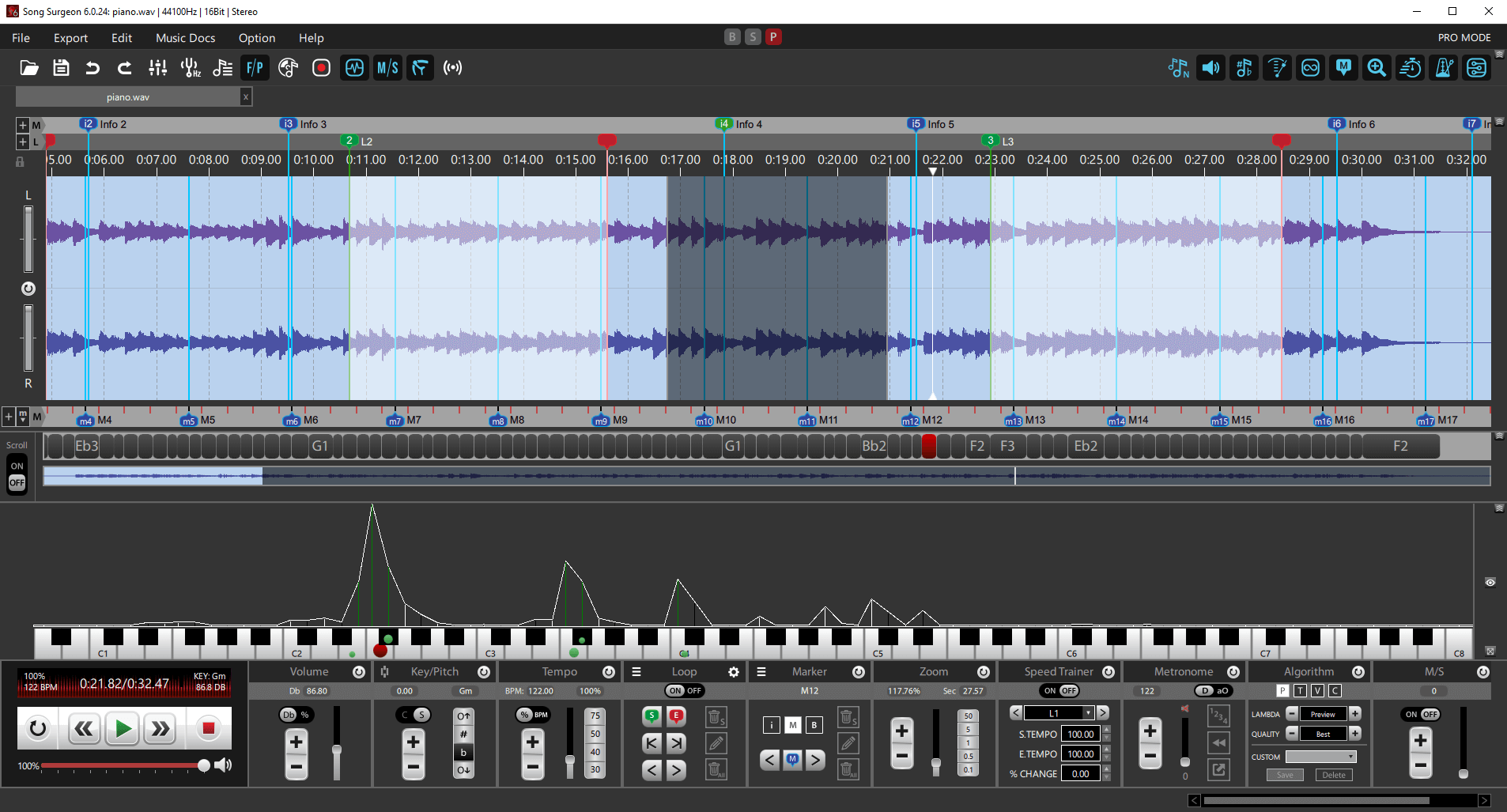
Bring a recording into tune with your instrument, or move a song into a more comfortable key. Song Surgeon 6 lets you adjust pitch in cents or semitones and hear the result while you practice.
For automatic detection of a recording’s reference pitch, the optional Song Tuning add-on for Pro can measure its tuning and help you retune the whole song.
Desktop software · Demo includes 4 hours of use · Song Tuning is a paid Pro add-on
START WITH THE PROBLEM YOU HEAR
Pitch correction adjusts audio toward an intended pitch. The right software depends on whether you need to fix individual notes, correct a recording’s overall tuning, or transpose the music. Those tasks require different controls.
A vocal pitch editor changes particular notes or pitch curves. Automatic vocal correction tools may guide notes toward a chosen key or scale. Look for those controls when the singer’s notes vary in accuracy.
If the recording is consistently sharp or flat against your tuned instrument, a small overall shift may solve the mismatch. Song Surgeon’s manual pitch controls and Pro Song Tuning add-on address this task.
A song can be correctly tuned but sit outside your comfortable range. Use Song Surgeon’s semitone controls to move the recording into another key while keeping its tempo.
Song Surgeon’s role: pitch adjustment and tuning of recorded audio for listening, practice, and export. For detailed editing of individual vocal notes, choose software designed for that workflow.
SMALL ADJUSTMENTS OR A NEW KEY
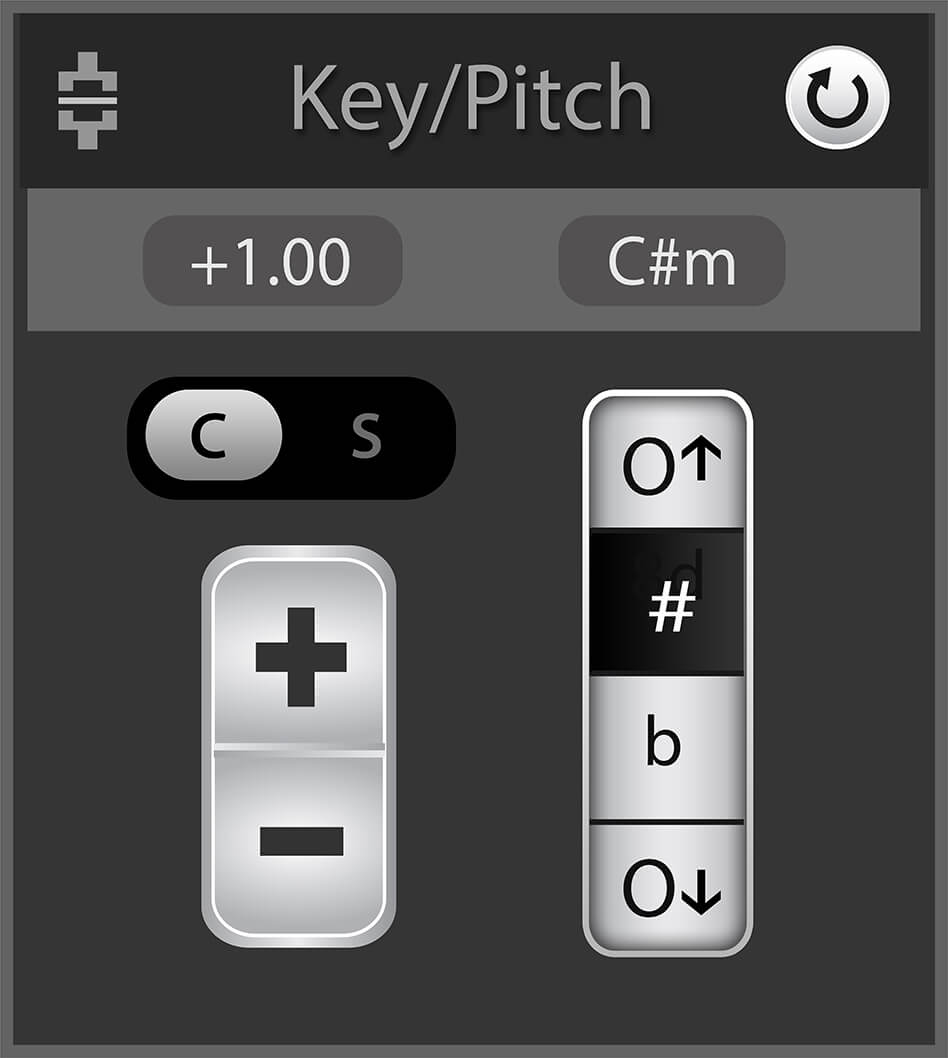
A semitone is one half step. A cent is one hundredth of a semitone. Use cents for a small tuning adjustment and semitones when you want to change the song’s key.
Use File → Open New Audio/Project File or the folder icon. Start with a supported audio file, such as MP3 or WAV, and listen to a clear musical phrase.
Open the Key/Pitch module. Its C/S control switches between cents and semitones. Select cents for fine tuning.
Use + to raise pitch or − to lower it. Compare the recording with your tuned instrument. A passage that sits 25 cents sharp, for example, needs a 25-cent downward shift.
Use Export → Entire Song to create a new audio file with the pitch adjustment applied. Choose a new filename so you can keep the original for comparison.
Create an audio practice loop to hear the same phrase repeatedly while checking an adjustment. Full controls are documented in the Song Surgeon 6 User Guide.
OPTIONAL SONG TUNING ADD-ON · PRO REQUIRED
A recording can have the right musical key yet sit slightly above or below your instrument’s tuning reference. The Song Tuning add-on measures that reference pitch and lets you choose a target such as A440.
Open your file, then open the Tuning module to run detection. Once the detected tuning appears, choose the target reference from the dropdown and confirm with Okay. Listen to the result, then export a new file to make the change permanent.
You can also enable Automatic Tuning Detection in Options → Program Settings 1 to analyze files as they open. Detection adds processing time. The detected reference and the target tuning are separate values: check both before applying a change.
For a detailed example, see retuning a song to A440. The Song Tuning add-on guide explains the detection settings.
Check a few parts of the recording, including sustained notes and passages with vocals. A single overall shift is appropriate when the recording shares a consistent offset. If different voices or instruments are out of tune with each other, shifting the entire mix moves them together.
For larger key changes in music containing vocals, Standard and Pro offer Formant Preservation to help reduce the change in vocal character. Results depend on the recording, processing settings, and amount of pitch change.
All three editions include manual key/pitch changes, tempo changes, looping, and audio export.
These editions add Formant Preservation and project files for saving your setup between sessions.
Automatic song-frequency detection and correction requires the separately purchased Song Tuning add-on for Pro.
Check the complete feature comparison, then choose your edition and any required add-ons on the Song Surgeon 6 purchase page.
A global pitch adjustment shifts the vocals and instruments together. It does not independently repair one singer’s note while leaving simultaneous backing instruments unchanged. Individual vocal-note correction calls for a dedicated pitch editor, usually working with a separate vocal track.
Song Surgeon provides independent pitch and tempo controls. You can adjust pitch while keeping playback at the original tempo, or change tempo separately for practice.
Song Surgeon 6 is paid desktop software for Windows and Mac. The free demo provides 4 hours of use to evaluate the program. Song Tuning is an optional paid add-on available for Pro.
TUNE THE RECORDING TO YOUR PRACTICE
Explore precise pitch controls, repeat a phrase, and hear how the adjustment fits your instrument.